
LEDEdit Pro 2026 is the new paid successor to the classic free LEDEdit — rebuilt for T1000s and modern LED controllers. Edit LED video on a real timeline, apply professional effects, and export directly to your T1000s SD card.
Why LEDEdit Pro?
- Native SD-card export — writes LEDEdit
.ledfiles for 19 controller families, including T-1000 / T-2000, K-1000C and K-8000 / T-8000 - Timeline with scenes — multi-layer timeline, scene tabs, snapping, copy / paste and full undo
- 151 built-in effects — each with its own parameters, plus 149 palettes, glow and blend modes
- Per-LED preview — see every frame sampled onto your real LED positions while you edit
- Media import — MP4, MOV, MKV, AVI and WebM video, XDAT / TOL animations and PNG, JPG, BMP, WebP or GIF images
- One-time payment — lifetime license with free updates
New here? Start with the LEDEdit Pro 2026 tutorial.
Pricing
€99 + VAT — lifetime license via Gumroad. One payment, unlimited projects.
Feature Tour
Chapters, transcript and more: LEDEdit Pro 2026 video tutorial.
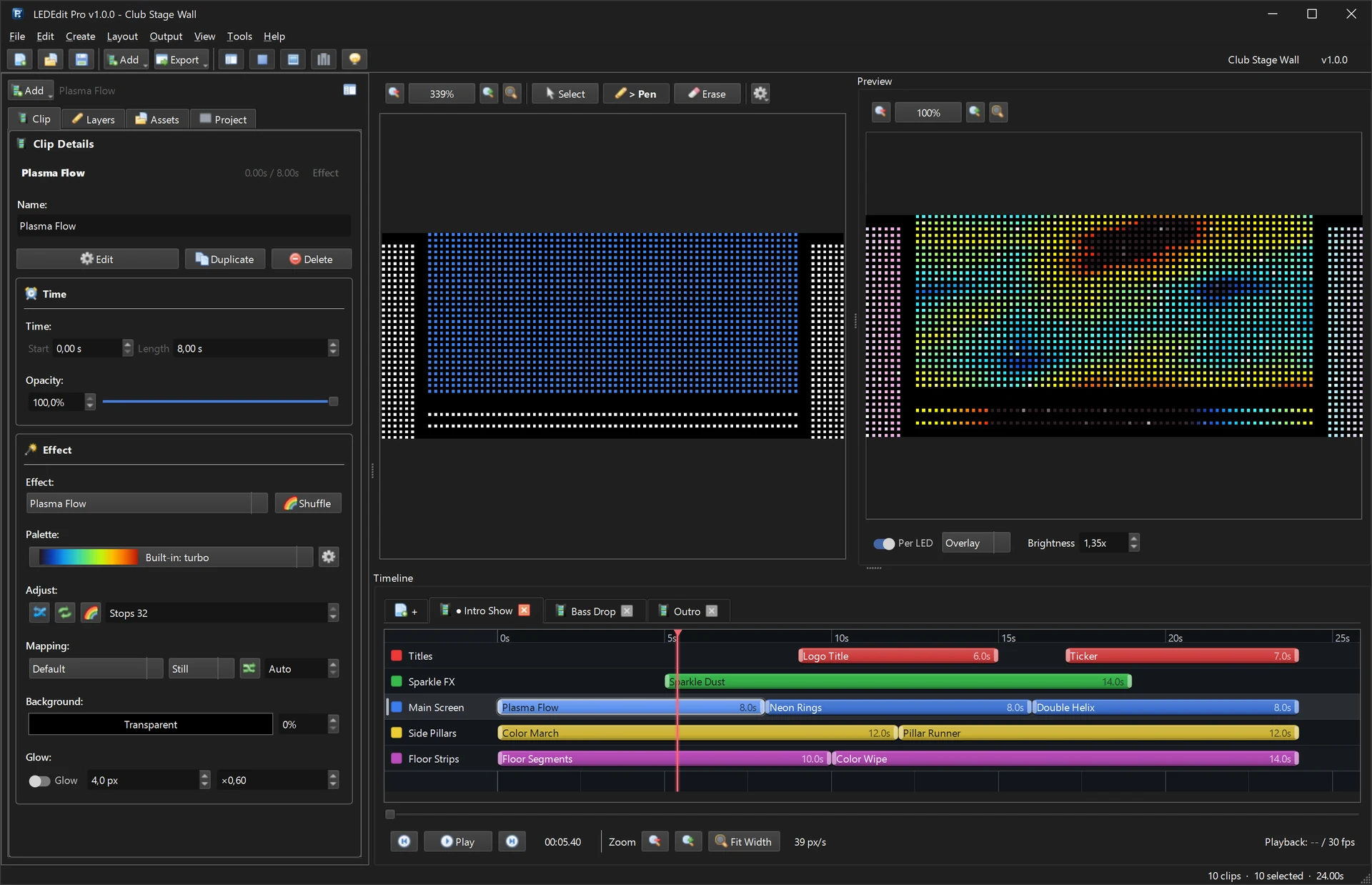
Every screenshot on this page comes from the real app running one demo project — a club stage wall with a main LED screen, two side pillars and floor strips. No mock-ups. Click any image to open it full size.
Timeline & scenes
Build whole shows on a multi-layer timeline
- Scene tabs keep show parts apart — intro, drop, outro — and you choose which scenes to export.
- Put effect, text, image and video clips on any layer; each layer is its own region of your LED layout.
- Snap to grid, zoom to fit, copy / paste / duplicate clips, full undo and redo.

LED Layout Creator
Map the LEDs exactly as they are wired
- Place LEDs on a millimetre grid, stamp grid patterns and wire them serpentine, linear or manually.
- Every port shows its LED count against the controller limit, and Layout Check flags problems before you export.
- Import and export LEDEdit DXF files, then push the layout straight into the editor.

Layers & masks
Paint where each effect plays
- Each layer gets a colour, visibility, lock and opacity.
- Paint layer masks right over the LED positions with pen, eraser, rectangle, ellipse and fill tools.
- Effects fill only the LEDs inside the mask — screen, pillars and floor strips run different content at the same time.

Live preview
See every LED before you export
- The Per LED preview shows the composed frame sampled onto your real LED positions.
- Switch between overlay and LED-only views and boost preview brightness.
- Scrub or play the timeline — what you see is what gets written to the SD card.

151 effects
Effects you can actually shape
- Browse or search 151 effects in 17 categories — runners, ripples, plasma, kaleidoscopes, rain, fire and more.
- Every effect exposes its own parameters plus palette, speed, duration, background and glow.
- Hit Shuffle to explore variations in one click.

Palette editor
Palettes that make LEDs pop
- Start from 149 built-in palettes or the LEDEdit presets, then save your own.
- Build gradients with Quick Gradient, Generators, Combine and Anchors, or reverse, invert and double them.
- Import
.pal/.hexpalettes from other tools.

Text clips
Titles and tickers that stay readable on LEDs
- Font, size, bold / italic, letter and line spacing tuned for low-resolution matrices.
- Outline and gradient text driven by any palette.
- Static or animated text with speed and direction, plus one-click position presets.

LEDEdit .led export
Straight to the controller’s SD card
- Pick the LEDEdit version, controller family and chip / IC type — T-1000, T-2000, K-1000 offline and more.
- The export preflight lists scenes, frame rate, ports, LED count and program slots before anything is written.
- Animation, main-controller and RGBW packages, with per-port chip overrides.
- If a controller does not play the file, export the DXF layout + AVI video and build the
.ledin free LEDEdit — fallback guide.


.led files and package firmware upgrades (up.lw).More pro tools


.tst).

Video Generator
Render effect loops as video clips
- Pick an effect, tune its parameters and palette, and watch the live preview.
- Set output size, length, FPS, rotation and a lossless export profile.
- Exported loops land in the project folder and can be added to a layer automatically.

Built for everyday work


Perfect For
- T-1000 / T-8000 / K-1000C and 16 more controller families (controller pages) with chips such as WS2811, WS2812 and SM16703
- Stage, dance floor, and architectural LED installations
- Holiday and facade lighting with video-mapped content
- Anyone outgrowing the free LEDEdit editor
See it in action
Watch a real 90-second build from empty project to SD-card export — timeline, layers, plasma effect and T-1000S export with per-LED preview: LEDEdit Pro 2026 video tutorial demo.
Compare: LEDEdit Pro 2026 vs Free 2014 vs 7000-pack
| Feature | LEDEdit 2014 (Free) | $50 7000-pack | LEDEdit Pro 2026 (€99) |
|---|---|---|---|
| Price | Free | $50 one-time (effects only) | €99 one-time, lifetime license, free updates |
| Effects | SWF (Flash) files, ~40 legacy | 7,000 pre-rendered clips (SWF/AVI/MOV/MP4) — no editor | 151 built-in effects, 17 categories + 149 palettes + video/image/text clips |
| Timeline | Single track, no scenes | No timeline — files to import elsewhere | Multi-layer timeline with scene tabs, snapping, copy/paste, undo |
| DXF / Layout | DXF layouts only | No layout tool | LED Layout Creator — draw, serpentine/linear wiring, DXF import & export |
| Preview | Canvas only | No preview | Per-LED live preview sampled onto your real LED positions |
| Export | One controller version per install | No export — effects for existing software | 19 controller families, 334 chip profiles, export preflight, .led + MP4/AVI/MKV/MOV |
| Support | Community / forum | Bundle support only | Direct support + DXF+AVI fallback guide for legacy controllers |
Availability: InStock — lifetime license via Gumroad. No aggregated star rating is published in this repo; see buyer feedback and leave your own review on Gumroad — LEDEdit Pro.
Read the full comparison: LEDEdit Pro 2026 vs free LEDEdit.
Learn More
- Download Free LEDEdit Versions — still available, still free
- Create Custom Effects with Pixel LED Animator 3 — companion tool for custom animations
- Ultimate LED Software Stack — how LEDEdit Pro fits your workflow
- Create 3D LED Effects with VJ Loop Studio — generate VJ loops for LEDEdit Pro
LEDEdit Pro works alongside your existing LEDEdit workflow — import your LEDEdit DXF layouts, and if a controller needs it, hand DXF + AVI back to free LEDEdit.